


Need a Professional Hand?
If a DIY fix isn't enough, our insured technicians are just a click away. We’ll diagnose the issue and get your home running right again.
BOOK NOWMost Maytag Centennial dryers that tumble without heat have a blown one-shot thermal fuse in the lint screen housing. Confirm the prefix first: MEDC for electric and MGDC for gas. The two free checks come before the back panel, and for electric models, the breaker is the first stop of every no-heat call.
| Symptom | Most Likely Cause | DIY or Pro |
|---|---|---|
| Drum runs, no heat | Blown thermal fuse (lint screen housing) | DIY with multimeter |
| Maytag dryer blowing cold air | Breaker half-tripped (electric) | DIY: reset breaker |
| Error code F1E1 | ACU / control board fault | Pro scope |
| Error code F3E1 | Exhaust thermistor or loose connector | DIY (connector) / Pro (board) |
| Heats 5 min then stops | Gas valve coil failure (gas models) | Pro scope |
| No heat, no code, no spin | Multiple faults | Pro scope |
Open the door and check the label on the door frame or drum edge. MEDC is a Maytag electric dryer; MGDC is a Maytag gas dryer. The Maytag Centennial is the top-loading direct-drive platform this guide covers.
If the name says Bravos XL or Maytag Maxima, jump to the Bravos XL routing section below: this guide covers the Centennial only. Maytag Commercial Technology models with a CT suffix follow the same Centennial diagnostic path unless the production year puts them on the newer ACU generation.
Electric MEDC models draw 240V across two 30-amp breaker legs. One leg powers the drum motor; the other powers the heating element. One tripped leg leaves the drum running while the element goes cold.
A Maytag electric dryer not heating while the drum keeps spinning is this pattern. Any Maytag MEDC dryer not heating problem that started suddenly, without warning codes, begins at the breaker panel before any disassembly.
Two checks cost nothing and cover the most common no-heat causes on a Maytag Centennial: a tripped breaker leg and a blocked exhaust path. If you are asking yourself why is my Maytag dryer not heating just one load after the last normal cycle, run both checks before touching the rear panel. A Maytag dryer not getting hot enough rather than completely cold often points to one of these two causes rather than a failed component.
Go to the breaker box and find the double-pole 30-amp dryer breaker. Switch it fully off, wait ten seconds, then flip it back on. A half-tripped breaker looks identical to a fully closed one: pushing it all the way off is the only way to clear it.
Also confirm you are not running the dryer on the Air Only cycle, which produces no heat by design. A Maytag dryer no heat complaint from an Air Only cycle is a cycle selection issue, not a component failure.
Pull the dryer from the wall and disconnect the duct at the back fitting. Feel for airflow at both the dryer port and the wall cap outdoors. Crushed flexible duct, a clogged lint canister in the exhaust path, or a sealed wall cap can all cut airflow.
A Maytag dryer not drying clothes completely over several weeks often means the vent is slowly restricting, and thermal fuse failure is the next step. Professional dryer vent cleaning clears the restriction and prevents the replacement fuse from blowing again in the same load.
The thermal fuse is a one-shot safety device that opens when exhaust temperature spikes past its rated limit. When it fails, the drum keeps running and the dryer pushes cold air. The lint screen housing fuse location on the Centennial is what makes this platform different from the Bravos XL. Opening the right panel first saves the most time on every Maytag Centennial dryer not heating call.
On every MEDC and MGDC Centennial model, the thermal fuse sits in the lint screen housing area, reached through the rear panel after removing roughly eight to ten perimeter screws. This is not where Bravos XL owners look: the Bravos XL mounts its fuse on the blower housing, not in the lint screen housing area. A Maytag dryer not heating after cleaning lint trap is nearly always this fuse, blown because the exhaust duct was still blocked even after the trap was cleared.
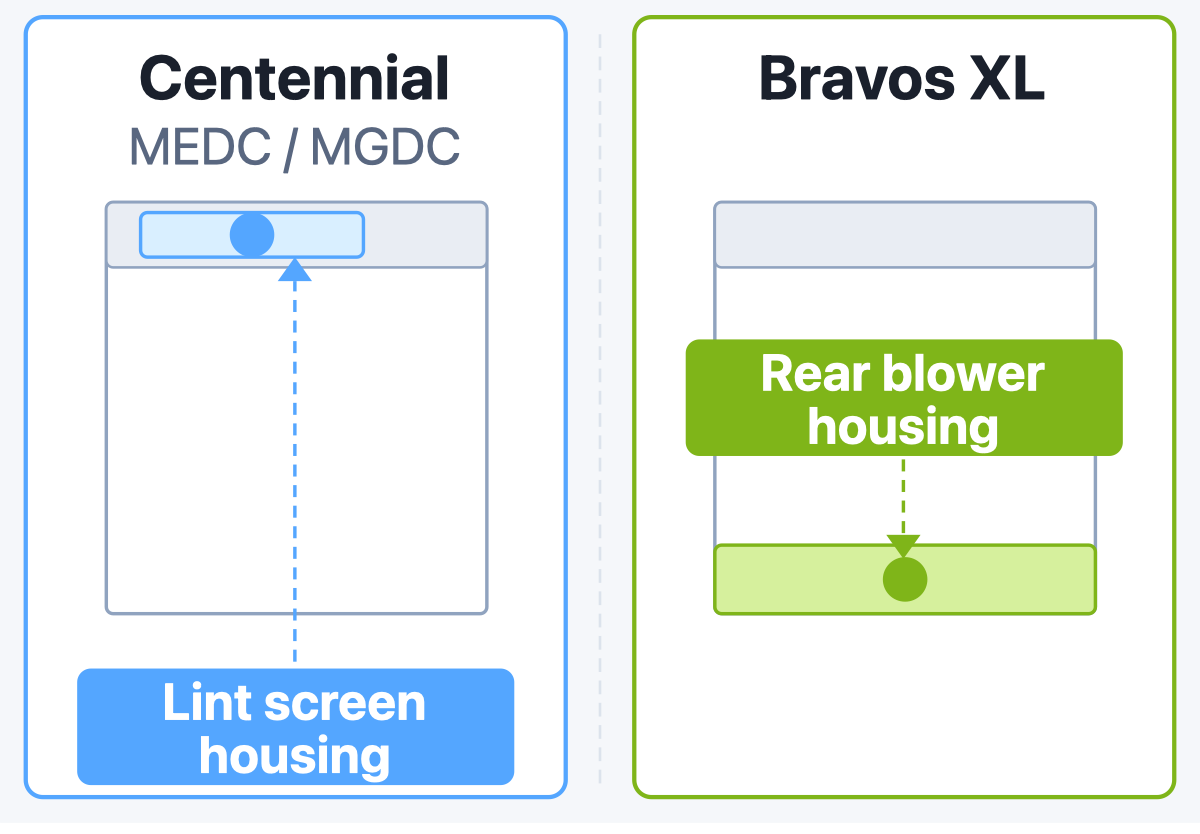
On Centennial models we always start at the lint screen housing, not the rear blower housing. Maytag put the fuse there on this platform, and the technician who goes to the wrong panel first wastes twenty minutes on a job that should take five.
Unplug the dryer before touching any component: the heating element and control board carry 240V. Run a multimeter continuity test across the thermal fuse terminals after disconnecting one lead. A healthy fuse reads near-zero ohms; an open circuit means it has blown and cannot be reset.
The cycling thermostat clips to the blower housing and cycles the heat on and off during a normal load. Run the cycling thermostat blower housing clip test at room temperature: closed reads healthy, open means it has failed. The hi-limit thermostat nearby uses the same test method.
On MEDC models, test the heating element when the fuse and both thermostats pass. Healthy readings fall roughly between 8 and 25 ohms depending on the model; published specs vary across sources, so the model’s own service manual carries the exact figure. Zero ohms or an open circuit is the unambiguous failure. A reading anywhere in that range is not itself a sign of failure.
Display-equipped Maytag Centennial models store fault codes retrieved through service diagnostic mode. When entered correctly, the display shows “8:88” and console indicators light; only a single active fault code appears at one time. Exit with the POWER/CANCEL button. Note the exact code before pressing POWER/CANCEL; the sections below identify each fault and its path to repair.
The codes below accompany the most common Maytag dryer not heating up situations. For the button entry sequence, check your model’s tech sheet on Maytag’s support site: the sequence is model-specific, and a wrong entry does nothing.
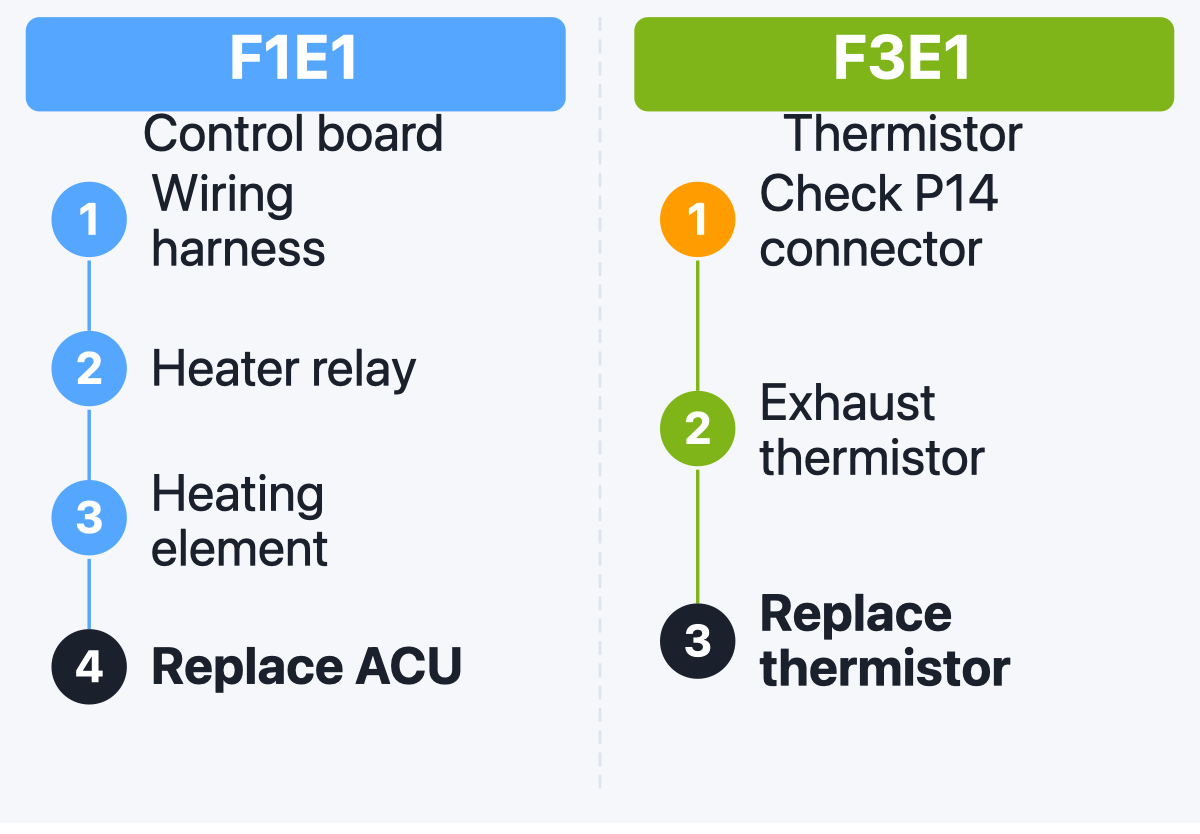
F1E1 primary control failure points to the appliance control unit. Check the wiring harness connectors to the heater relay before assuming board failure: a loose connector fires F1E1 without any actual board damage. Confirm the heating element itself is not open or shorted to ground, and on gas models test the gas valve solenoid coil continuity.
If all components test good, the control board needs replacement. ACU replacement is professional scope: the part must match the board generation, and a mismatched board can cause runaway heat on a Centennial.
F3E1 exhaust thermistor open means the circuit is reading an open fault. In my experience, this code fires because the P14 or J14 connector is not seated in the ACU rather than because the thermistor itself has failed. Make the P14 connector first check before ordering any part: reseat it, clear the code, run a test cycle. A healthy exhaust thermistor reads about 10,000 to 25,000 ohms at room temperature.
F3E2 indicates a shorted exhaust thermistor; F3E6 and F3E7 flag moisture sensor faults, both surfacing only in service diagnostic mode. If F3E1 persists after reseating the connector and the thermistor tests open, the control board needs replacement.
MGDC Centennial models are the gas dryers in this family. Before accessing any gas train component, close the shutoff valve behind the dryer. Gas work beyond that valve is licensed professional territory in Colorado, and our insured technicians handle it from there.
With the valve closed and the dryer unplugged, you can safely inspect and test the components below. A Maytag MGDC dryer not heating on the gas side follows a sequence: confirm the supply valve is open, then assess the igniter, then test the gas valve solenoid coils. If a code is on the display, follow the code-first display path in the MEANING section; the gas electric fork brought you here for a component fault, not a code fault.
Start a timed-dry high-heat cycle and look through the access plug under the door. A healthy gas igniter glows red within 45 to 90 seconds of cycle start. Watch for the gas igniter three-amp threshold: a healthy igniter draws about 3.5 amps, and one drawing under approximately 3 amps may glow but cannot get hot enough to open the gas valve.
If there is no glow, a multimeter confirms an open circuit. Maytag gas dryer not heating with a visible glow but no flame is the degraded-current pattern: the igniter draws current but not enough to fire the burner.
MGDC Centennial models carry three gas valve solenoid coils. Coil 1 reads approximately 1,400 ohms, coil 2 approximately 570 ohms, and coil 3 approximately 1,300 ohms when healthy. A coil that fails when hot but passes a cold resistance test produces the intermittent-heat pattern: the dryer heats for a few minutes, stops, then resumes after cooling. In my experience, a Centennial that heats for two loads, skips the third, and recovers is almost always a coil failing hot: cold resistance tests pass and nothing looks wrong.
The gas valve coils replace as set; individual replacement leaves a borderline companion coil in place that fails shortly after. We source parts through national supplier networks and manufacturer contracts.
The Bravos XL carries the Maytag name but runs on a Whirlpool-corporate shared platform from the Cabrio family. Its thermal fuse is on the blower housing, not in the lint screen housing area.
Its fault codes are L2 and F4Exx, and those codes are covered in our Whirlpool dryer not heating guide, not here. Running the Centennial diagnostic steps on a Bravos XL will take you to the wrong access panels and will not identify the fault.
The Maytag Maxima is Maytag’s front-load platform sharing the Whirlpool WFW design: a different machine from the top-loading Centennial. Maxima fault codes including L2 and F4Exx variants are covered in the same Whirlpool dryer not heating guide. If your dryer says Maytag Maxima, that guide has the right diagnostic sequence for your machine.
Some faults on the Centennial platform sit clearly in professional scope. ACU board replacement, gas valve work beyond the shutoff valve, and any situation where a Maytag dryer won’t heat and the fuse, thermostat, and element all test good belong to that category.
Those outcomes point to the control board or a wiring harness fault. The repair needs the board’s own service documentation to avoid fitting the wrong ACU generation. Our insured technicians carry service documentation for MEDC and MGDC Centennial models and identify the ACU versus CCU generation split before ordering a part.
If you replaced the thermal fuse and the Maytag dryer no heat fault returned within one load, stop replacing parts and book a diagnostic. The vent system is the cause in that case.
Maytag dryer repair through Wilson and Myers covers the full Centennial diagnostic, from the breaker check through the gas train. Our Maytag dryer repair in Denver page has Centennial-specific service details. For the thermal fuse pattern across all brands, our dryer not heating guide covers the brand-agnostic depth this article builds on.
Why does my Maytag dryer run but not heat up?
Most Maytag Centennial dryers that run without producing heat have a blown thermal fuse in the lint screen housing. The drum motor runs on a separate circuit, so it keeps spinning with the heating circuit open. Maytag dryer runs but no heat almost always traces to that fuse, with a blocked exhaust vent as the root cause that blew it.
Where is the thermal fuse on a Maytag Centennial dryer?
On Maytag Centennial models (MEDC and MGDC prefix), the thermal fuse sits in the lint screen housing area, reached by removing the rear panel. This differs from the Bravos XL, which mounts its fuse on the blower housing. Removing the wrong panel is the most common homeowner mistake on a Maytag Centennial dryer not heating call.
What does F1E1 mean on a Maytag dryer?
F1E1 indicates a primary control failure in the appliance control unit. Check the wiring harness connectors and the heater relay before replacing the board. If the wiring, relay, and heating element all test good, the ACU needs replacement. This is professional scope: a wrong-generation board can cause runaway heat on the Centennial platform.
Can a clogged vent cause my Maytag dryer to stop heating?
Yes. A blocked exhaust vent causes exhaust temperature to spike past the thermal fuse’s rated limit. The fuse opens, cutting the heating circuit while the drum motor keeps running.
Replacing the fuse without clearing the vent produces the same failure immediately. Clear the vent and replace the fuse on the same visit.
Does a Maytag Bravos XL dryer heat the same way as a Centennial?
No. The Bravos XL runs on a Whirlpool-corporate platform with a different thermal fuse location (blower housing, not lint screen housing) and different fault codes (L2, F4Exx). The diagnostic steps in this article do not apply to the Bravos XL. Use the Whirlpool dryer not heating guide for that machine instead.
How do I enter service diagnostic mode on my Maytag dryer?
The entry sequence is specific to each model. When entered correctly, the display shows “8:88” and all console indicators light. Only one active fault code appears at a time.
Press POWER/CANCEL to exit the mode. For the exact sequence, download the tech sheet for your model from Maytag’s support site: using a generic sequence on the wrong model does nothing.
Wilson and Myers provides Denver Metro service for Maytag Centennial dryer owners across the Front Range. Our insured technicians cover Denver, Lakewood, Littleton, and Highlands Ranch. Book online for a Centennial diagnostic when the free checks above have not resolved the fault.
Our insured technicians diagnose Maytag Centennial dryers across the Denver Metro Area. We source parts through national supplier networks and manufacturer contracts.
Found This Helpful?
You open the freezer Friday night and the GE side-by-side ice bin is empty, but the food is cold and the water dispenser works fine. Most GE refrigerator ice m…
A residential dishwasher leaking from bottom rarely fails where the dishwasher puddle on floor tiles appears. Pull the kick panel; the highest wet surface mark…
A Samsung washer not spinning leaves clothes wet in the drum and the dryer waiting. Samsung's four platforms handle this differently: WF front-load, WA top-loa…
You opened the KitchenAid freezer this morning and the bin was empty. In my experience, the arm is the first thing worth checking: the fix costs nothing and ta…
A Frigidaire oven not heating can come down to a setting rather than a part. Before you book a repair, two checks cost nothing and take under a minute: the clo…
A Whirlpool dryer that tumbles but never heats traces to one of five faults, and three of them cost nothing to check. Here is the order to work through them, p…
Welcome to the community.
You'll receive our next expert update soon.

Wilson & Myers is a verified member of the Denver Metro Chamber of Commerce.


