

Need a Professional Hand?
If a DIY fix isn't enough, our insured technicians are just a click away. We’ll diagnose the issue and get your home running right again.
BOOK NOWThe display is dark. Every button gets no response. Dinner is planned and the oven won't turn on. Why won't my oven turn on? Before you call anyone, know this: the fix is sometimes two minutes at the breaker panel, and sometimes it is a blown thermal fuse that sacrificed itself to protect your appliance during self-clean. This guide works through every cause ordered from easy to hard, from the check you can do right now to the faults that need an insured technician.
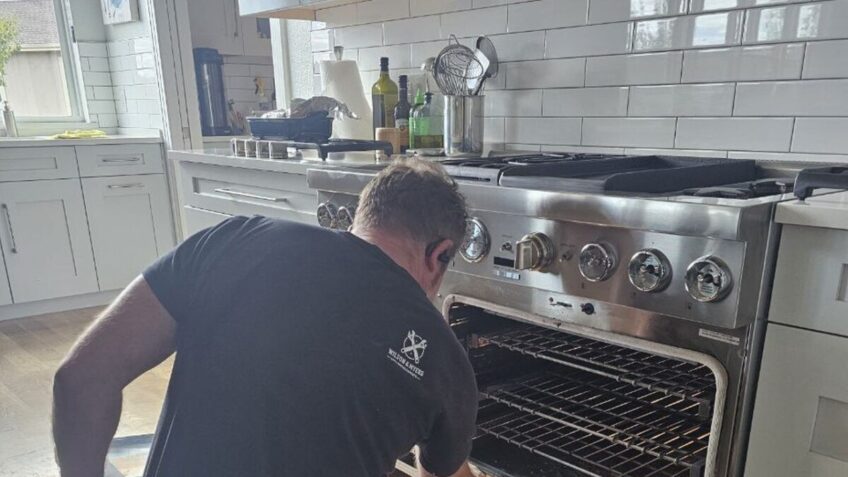
Most cases of an oven not turning on trace back to a tripped circuit breaker, a blown thermal fuse after a self-clean cycle, or a failed control board. Check the breaker first. If that does not restore power, the self-clean history of the oven points directly to the most likely cause. A technician can test the thermal fuse and control board on-site with the right tools.
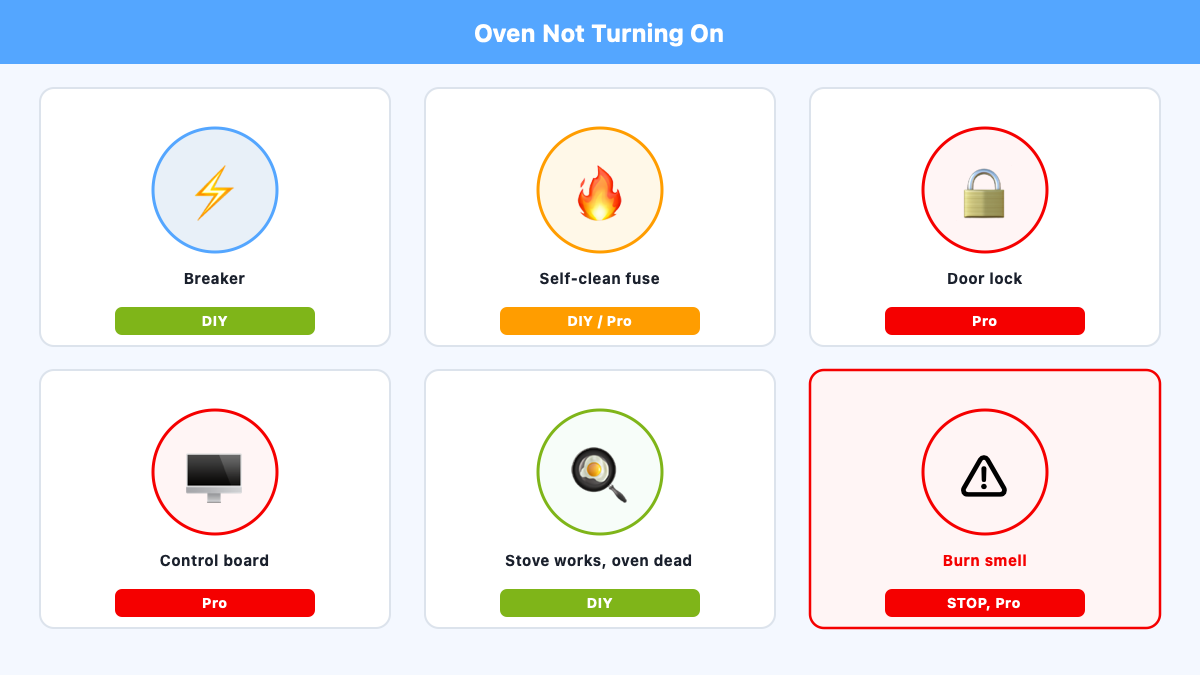
| Symptom | Most Likely Cause | DIY or Pro | First Check |
|---|---|---|---|
| Display blank, all controls dead | Tripped breaker | DIY | Flip breaker OFF then ON |
| Dead after self-clean cycle | Thermal fuse blown | DIY-adjacent / Pro | Power cycle; then call W&M |
| Door locked, won’t start | Door lock motor stuck | Reset attempt then Pro | Power cycle 30-60 seconds |
| Display active, won’t cook | Control board relay | Pro | Visual inspection; book W&M |
| Stove works, oven dead | Double-pole breaker half-trip | DIY | Flip both poles OFF then ON |
| Burn smell, oven dead | Terminal block wiring | Pro | Do not reset; book W&M |
A tripped circuit breaker is the fastest fix for an electric oven not turning on. Electric ovens run on a 240-volt circuit fed by a double-pole breaker that occupies two slots in your panel. If that breaker trips, the oven goes completely dark. The whole check takes two minutes. This right now triage step is where to start before anything else.
Go to the breaker panel. Find the breaker labeled “Oven,” “Range,” or “Kitchen.” On an electric range, it will be a double-pole breaker with a wide handle spanning two vertical slots. Follow these steps:
For ovens where the display is active but no cook mode starts, press and hold Cancel for five seconds. That clears some locked board states before you re-enter a bake command. If the oven does turn on but struggles to reach temperature, that is a different problem covered in our guide on oven not heating up.
The fuse monitors temperature in the wiring path behind the oven cavity walls, not the cavity temperature itself. When heat reaches the fuse’s trip point, it opens the circuit and cuts all power. The result looks identical to a tripped breaker from the outside: display blank, no response to any control. A continuity test with a multimeter at the Rx1 resistance setting tells the story. Near zero ohms means the fuse is intact. An open circuit means it has blown and needs replacement. The thermal fuse non-resettable design means no reset button exists. Once blown, replacement is the only fix.
Self-clean cycle temperatures reach 800 to 900 degrees Fahrenheit inside the oven cavity. The self-clean villain in most dead-oven calls is that extreme heat: it conducts through the cavity walls into the wiring harness and the area where the thermal fuse sits. If the fuse is positioned near enough to a heat path, it can blow during or immediately after the cycle. The classic presentation: oven worked perfectly, self-clean ran, display dark the next morning.
After Thanksgiving weekend, the calls are almost always the same: oven ran self-clean the night before, dead the next morning. The thermal fuse did exactly what it was designed to do. It’s a repair, not a replacement.
In my experience, this Thanksgiving self-clean spike is the most consistent pattern across Denver Metro cooking-appliance calls. The Denver holiday locality effect is real: homeowners run self-clean before a big meal, and the oven is dark the next morning. One part did its job, and replacing it restores full operation.
Some older ovens use a resettable thermal switch instead of a one-time fuse. These have a small red button on the back of the oven near the door hinge bracket. If that button has popped out, pressing it may restore power. Most modern ovens use the non-resettable thermal fuse. Check your model documentation before assuming either type.
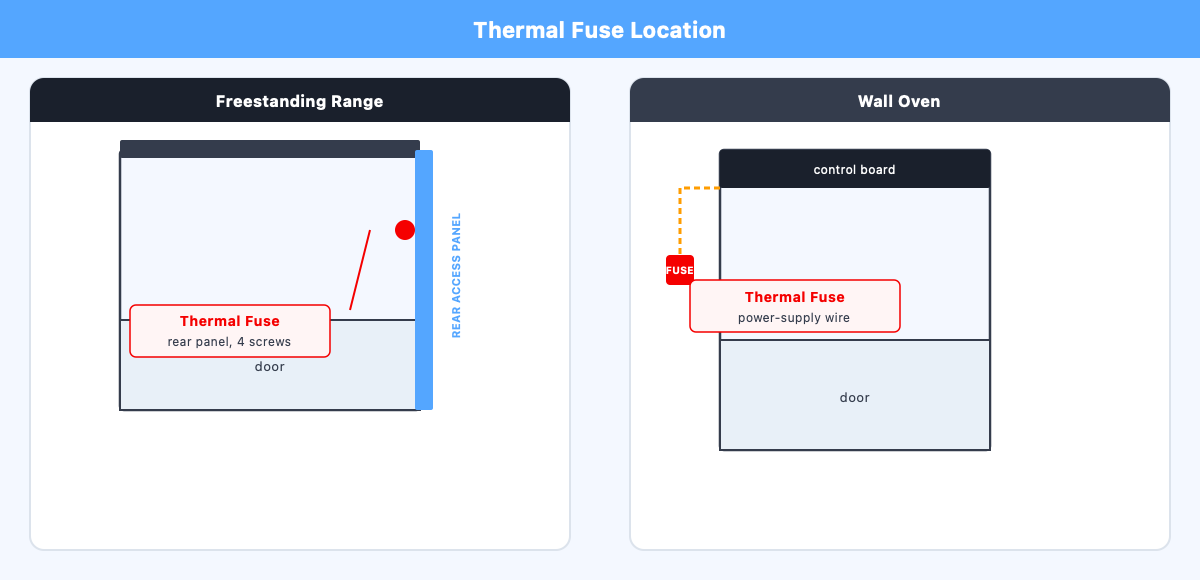
The thermal fuse location on most freestanding ranges is behind the rear access panel, typically held by four screws. On Whirlpool wall ovens specifically, the Whirlpool wall oven fuse location is in the black power-supply wire going to the electronic control board. Photograph the wire orientation before disconnecting anything. Sourcing the correct OEM part number for your specific model is the real barrier for most homeowners. For a reliable wall oven repair, our technicians source through national supplier networks and confirm the correct part number before the visit.
Modern ovens refuse to start any cook cycle if the control board reads the door as locked. The door lock safety interlock engages automatically at the start of self-clean to prevent opening the door at 800 degrees. If the lock motor is then damaged by that same extreme heat, the door lock mechanism may never execute the “unlock” signal after the cycle ends. The oven sits in a permanent no-start state, even though the self-clean is long finished.
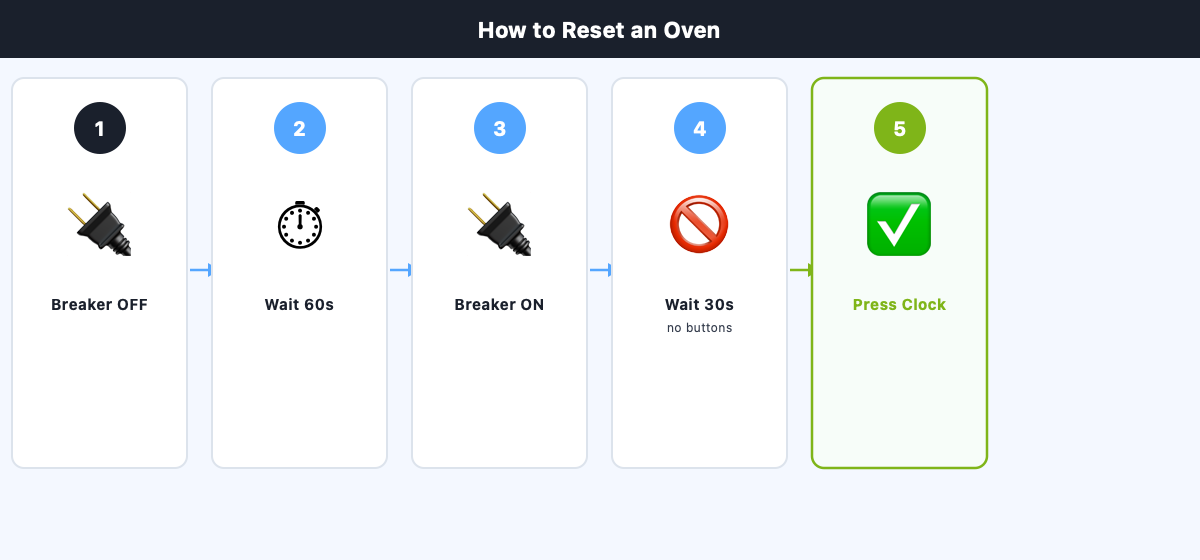
Try a power cycle first: flip the breaker OFF, wait 30 to 60 seconds, restore power. On Whirlpool ranges, pressing Cancel/Off and waiting 30 to 90 minutes for the oven to cool can allow the latch arm to disengage. If the door opens after a power cycle but the oven still will not start, the door latch switch is stuck reporting a locked state. That is pro territory.
Tried the breaker reset and the power cycle and the oven is still dark? Our technicians carry the diagnostic tools to test the thermal fuse, door latch motor, door latch switch, and control board on-site. Book online and our Denver Metro team will confirm availability for your area.
An oven display not working is the clearest board-level signal. When the display goes blank and a breaker reset does not restore it, the control board is the likely cause. The board manages the heating element relay, the display, and the door lock motor. A control board test voltage check confirms the diagnosis: a technician measures input voltage at the board terminals. If correct voltage arrives but the board produces no output, the board has failed. A separate relay failure pattern shows the oven control panel not working for cook commands even while the display stays lit. Both cases require board replacement.
Control boards on Whirlpool, GE, Samsung, and LG ranges are vulnerable to self-clean heat damage. The extreme temperatures conduct from the oven cavity to the area behind the control panel. Visible burn marks, darkened traces, or swollen capacitors confirm the failure. When burn marks appear, burn marks board replacement is the only path forward. Cleaning a scorched board does not restore function, and ordering the wrong board is expensive. Our technicians confirm the correct board by model number and visual inspection before ordering.
The oven not turning on but stove works pattern comes up constantly on electric ranges. An oven no power condition while the cooktop stays live is a diagnostic clue, not a contradiction.
Electric ovens need both 120-volt legs of a 240-volt circuit to run the oven cavity. The cooktop can run on one leg. When one pole of a double-pole breaker trips internally, the cooktop stays on while the oven goes dark. Gas range 120V vs electric range 240V matters here: a gas range uses a single-pole 120V breaker, so a blank display on a gas range points to that 120V circuit, not a double-pole issue.
This 240V double-pole half-trip state is real and common. The breaker handle may appear centered, not visibly tripped. Flip it firmly OFF, wait 30 seconds, back to ON. If that does not restore the oven, a blown thermal fuse or a failed control board is the next suspect. For stove and cooktop repair, our technicians confirm the specific failure on site. For gas ignition failure, see our gas oven not lighting guide.
On Whirlpool wall ovens, the thermal fuse sits in the black power-supply wire running to the electronic control board, not on the heating element circuit. Many Maytag ovens share the Whirlpool platform and include a resettable thermal switch on the back. For a Maytag specifically, our Maytag oven repair page carries the model-badge split and the three control-platform code tables. Check your model documentation before sourcing a replacement part. Whirlpool’s post-self-clean door lock procedure: press Cancel/Off, then wait 30 to 90 minutes for full cool-down.
Samsung ranges report door lock motor failures after self-clean: high heat damages the motor and leaves the oven stuck in a no-start state. A power cycle is the first step; persistent failure requires a technician. LG ovens share a control board vulnerability to self-clean heat. When the display is active but no cook mode responds, a burn-marked board is the likely cause.
Frigidaire ovens follow the standard thermal fuse pattern with the fuse on the rear access panel. GE recommends the same power-cycle reset after any door lock. Bosch and Thermador share similar thermal fuse and control board patterns but require a correct diagnosis before ordering any part. Our oven repair service covers all brands. For Wolf-specific issues, see our guide on Wolf oven not heating.
The breaker check is the one fully DIY-safe step. Every other diagnosis here requires removing panels, working with disconnected terminals, or reading multimeter results on parts that cost real money to replace incorrectly.
Call Wilson & Myers when the breaker reset does not restore power and the oven ran a self-clean cycle recently. A technician tests continuity at the fuse terminals with power disconnected, confirms the blown thermal fuse, and sources the correct OEM replacement through national supplier networks.
Call when the oven display is active but no cook mode starts. A failed control board relay is likely. The technician checks model number and board markings on-site before ordering, which avoids an expensive wrong-part mistake.
There is a burning smell near the back of the oven. The terminal block fire risk is serious: a loose connection arcing at 240 volts can ignite wiring insulation. Do not use the oven and do not reset the breaker repeatedly if you smell burning near the power cord entry. Book an inspection before powering the appliance on again.
The door remains locked after a power cycle and the oven will not start any cook mode. The door latch motor or door latch switch has failed. That is a component replacement, not a reset problem.
Wilson & Myers serves all of Denver Metro Area with insured technicians on oven repair for every brand in this guide. Book online to get your oven back in service.
The most common causes are a tripped circuit breaker, a blown thermal fuse after a self-clean cycle, or a failed control board. Check the circuit breaker first: flip to OFF, wait 30 to 60 seconds, and restore power. If the display stays dark and the oven ran a self-clean recently, a blown thermal fuse is the most likely cause.
Sudden failure with no warning usually means a thermal fuse that blew during or after a self-clean cycle, or a control board relay that failed mid-use. If the oven stopped working while cooking without any precipitating event, a board relay failure or a tripped breaker is most likely. Both require professional diagnosis.
Go to the breaker panel, flip the oven breaker to OFF, wait 60 seconds, and restore power. This clears the control board and allows the door lock motor to reset its position. After restoring power, wait 30 seconds before pressing any buttons. If the display returns and controls respond, the power reset worked.
Yes. Electric ovens contain a thermal fuse, a one-time-use safety device that interrupts power when the oven overheats. It sits behind the rear access panel on most freestanding ranges, or in the power-supply wire on some wall ovens. When it blows, the oven goes completely dead. A blown thermal fuse requires replacement, not a reset.
The most common answer to why is my oven not working but the top is running: a double-pole breaker half-trip. Electric ovens require both 120-volt legs of a 240-volt circuit. The cooktop can run on one leg, so when one pole trips internally, the cooktop stays on and the oven goes dark. Flip the breaker fully OFF, wait 30 seconds, and restore.
When an oven turns on then shuts off, it is experiencing a thermal cutoff triggered by the temperature sensor, or a control board relay failing partway through a cycle. If the oven control panel shows an error code before shutdown, the relay or temperature sensor is the likely cause. Professional diagnosis prevents an expensive parts guess.
Wilson & Myers provides oven repair and oven repair service across Denver Metro Area, including Denver, Boulder, Lakewood, Aurora, Littleton, Englewood, Sheridan, Wheat Ridge, Edgewater, Golden, Arvada, Westminster, Thornton, Northglenn, Commerce City, Brighton, Broomfield, Superior, Louisville, Lafayette, Longmont, Erie, Centennial, Greenwood Village, Cherry Hills Village, Glendale, Parker, Castle Rock, Highlands Ranch, Lone Tree, and Morrison. All brands serviced. Insured technicians.
Our insured technicians diagnose oven no-power faults across Denver Metro Area: breaker, thermal fuse, control board, and door lock. We source parts through national supplier networks and manufacturer contracts.
Found This Helpful?
It is a week before Thanksgiving, and you set the oven to 350 degrees before starting the stuffing. Forty minutes later, the preheat signal fires. That is roug…
A Frigidaire oven not heating can come down to a setting rather than a part. Before you book a repair, two checks cost nothing and take under a minute: the clo…
Has your refrigerator water dispenser stopped delivering water? In my experience, a large share of these calls end before a technician arrives. A child lock ac…
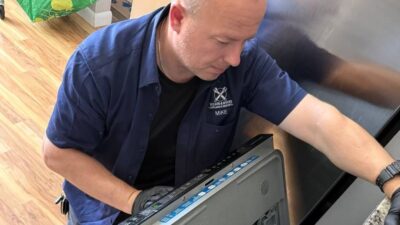
You open the dishwasher after the cycle and the plates look exactly as you loaded them: dry, cold, with last night's dinner still caked on. Your dishwasher is…
A washer that shakes violently during spin traces to one of seven causes, from a bunched load to a failed drum bearing. Here is the order to check them, and th…
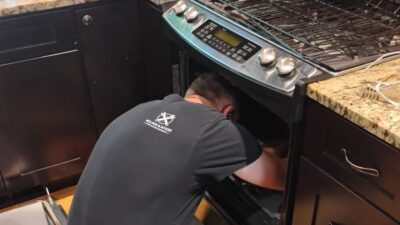
A gas smell during oven preheating is normal for about 90 seconds. Here is how Denver technicians tell routine startup odor from a real gas leak…
Welcome to the community.
You'll receive our next expert update soon.

Wilson & Myers is a verified member of the Denver Metro Chamber of Commerce.


